
Management Training – Revenue
Clinic Revenue
- How to calculate what your clinic has billed for the month/ last month/ MTD
- How to calculate remaining to billed for your clinic for the month (pending treatments to come)
- How to calculate the “gap” of how far off your clinic is from hitting budget
- How to figure out strategy to close the gap
- Clinic bad debts
- How to calculate what your clinic has billed for the month/ last month/ MTD
CORE
1. Report
2. Payment received report
3. Select Location > All Providers > All payments (ensure ONLY credit note and invoice is selected)> Date Range
Example of filters to select:

4. Run report
5. Total will appear right hand side
Example: $848,492.25 for the clinic below MTD billings 12/06/2024

PRINCIPLE
1. Reporting
2. Practitioner Income Report
3. Select a predefined date > Enter a Date range > Select Practice > By Invoice Paid Date < Run
Example of filters to select:

Example: $649,323 for the clinic below MTD billings 12/06/2024

- How to calculate remaining to billed for your clinic for the month (pending treatments to come)
- How to calculate the “gap” of how far off your clinic is from hitting budget
CORE
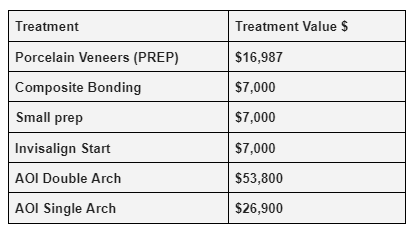
Treatment X Treatment Value $ Table
1. Report
2. Appointment Details Report
3. Select Location > Pending Status > Treatment (eg Prep/ Comp Bonding etc) > Date range for dates from tomorrow until end of the month (all pending dates to come, not billed yet)
4. Run report
5. Total will appear right hand side for the treatment number you have pending in your book not billed
6. Multiply Total number of treatment in step 5 X Treatment Value (in table above)
7. Repeat steps for all treatments your clinic performs – prep/ comp bonding/ small prep/ Invisalign Start / AOI Double Arch / AOI Single Arch
8. Total ALL pending treatments calculation in step 7 to calculate a grand total
9. Once you calculate a grand total of pending treatments to be billed, then you can minus this total from the total clinic budget and also minus your clinic’s billed MTD to identify your clinic’s gap to budget
Example of filters to select: Total Composite Bonding Treatment for clinic is 40 (treatments to be billed) X $7,000 (value) = $280,000

PRINCIPLE
1. Reporting
2. Report Builder
3. Select Data Source “Appointments” > Select Practice > Select Date to filter by “Appointment Date” > Select predefined date/ Date Range > Start Exploring
Example of filters to select: This report will show what’s been billed and what’s to be billed (pending to be billed)

4. The overview will appear. For this clinic – the total billed MTD and pending to be billed (not yet billed) is $1,573,689. The “gap” would be the total clinic budget minus the total treatment amount as per report.

5. If you would like to see ONLY what’s pending to be billed please select date range in the future from the next business day until end of the month. EG if today is 12/06/2024 – select date range 13/06/2024 to 30/06/2024.
Example: For this clinic below – $862,146 total treatment amount now shows what’s pending to be billed.

- How to figure out strategy to close the gap
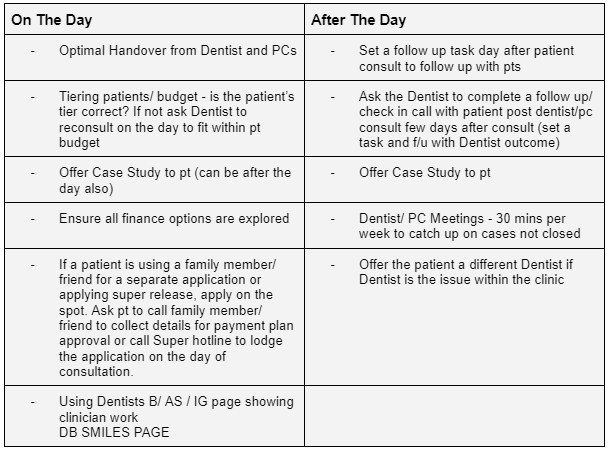
Strategy Tool Box/ Options to help close the gap to achieve budget
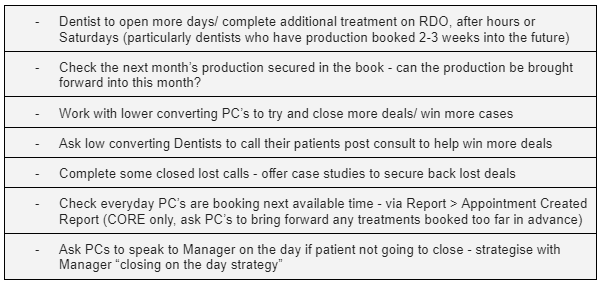
Strategy – On the Day of Consult/ Post Consult Options
- Clinic Bad Debts
- What causes a bad debt?
- How to check bad debts
- Payment issues s/sheet
- How to follow up bad debts
What causes a bad debt?
- No ACC Note
- Incorrect item codes pushed through
- Additional work completed by Dentist and finance not organised / not communicated with staff
- Dentists allowing patients to do half payments – organising there own special payment arrangements
- People not following up payment plan payments received
- Payment plans not activated
- Dentists not checking that there is pre-payment on the account before starting treatment
- People not following up bank transfers have been received
- Dentist not taking to FOC2
- No POA on appointment
CORE
1. Report
2. Treatment performed report
3. Select location > All Providers > Date you are looking to run
4. Run report
Example filters below:

5. Report will appear. Patients with “NOT PAID” under “Payment column” needs to be investigated why they are a “NOT PAID” status (as they may be a bad debt).
Example below patient Tharanya Gnanapiragasam has NOT PAID against her name.

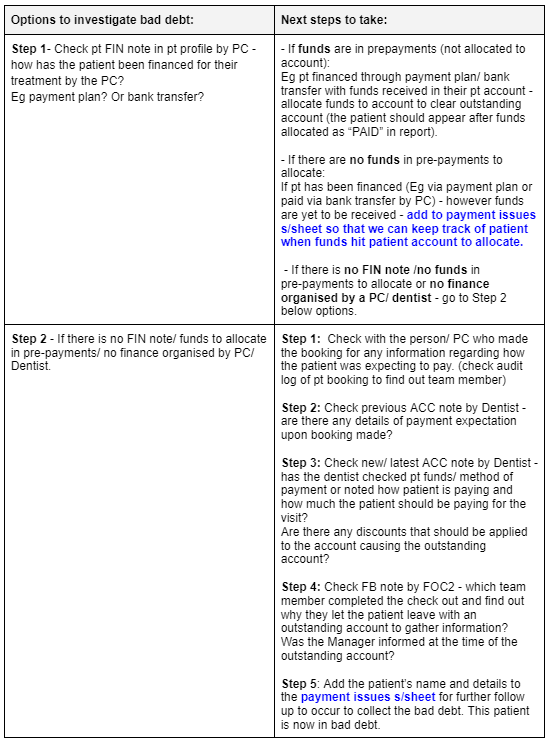
6. Some options/ steps to investigate if this patient above (Tharanya) is a bad debt and what to do next:
Payment issues s/sheet – what is this and when do you use this sheet?
When there are outstanding invoices either from awaiting payment plan or bank transfer funds, or you notice there is no “money” to allocate to account (prepayments) you must record the patient details and details of the outstanding account in the payment issues s/sheet in the relevant category.
The ideal is that there are NO BAD DEBTS for the clinic and all accounts have been finalised on the day of invoicing and treatments being completed.
Example of payment issues s/sheet from a clinic:

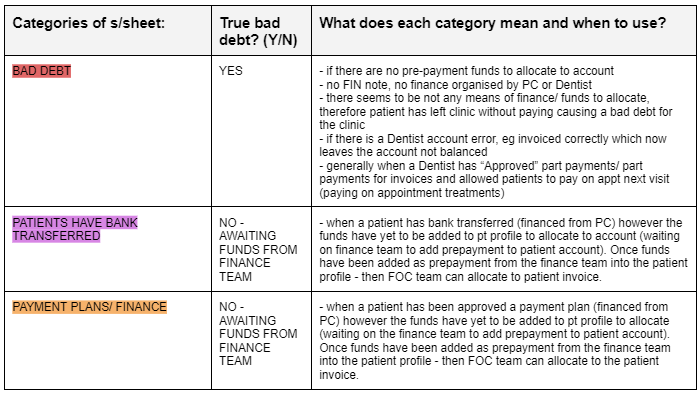
How to follow up bad debts?
Sample process below: