
In this module, we are going to explore how to reverse and invoice.
IMPORTANT: Do not reverse from previous months into this month, this will effect Dentist pay.
If you need to do this for any reason – you must notify Finance.
How to Reverse an Invoice
Is there a claim attached? In Core, click on the Claim icon in the left side menu;

Find the claim associated > click on the cog symbol > reverse claim
If there is no claim, click on the Payment icon in the left side menu

Find the payment associated > click the cog symbol > reverse payment
Now that the payment has been reversed, the invoice will be red, as incomplete.
Click on the Invoice icon in the left side menu

Locate the red invoice that needs to be voided.

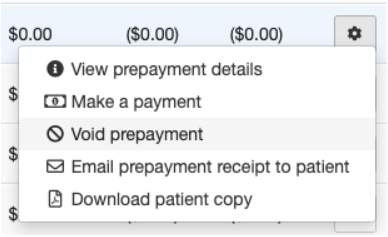
Click on the cog > Click void prepayment (if prepayment) or void invoice (if invoice)
You will now notice that if you voided an invoice – and go into treatment

The invoice you voided will now be back to blue, ready to be invoiced though again.