
What is Hubspot?
Hubspot is our Customer Relationship Manager (CRM) software. We use it as a central hub for information regarding the patient and any bookings or enquiries they have made
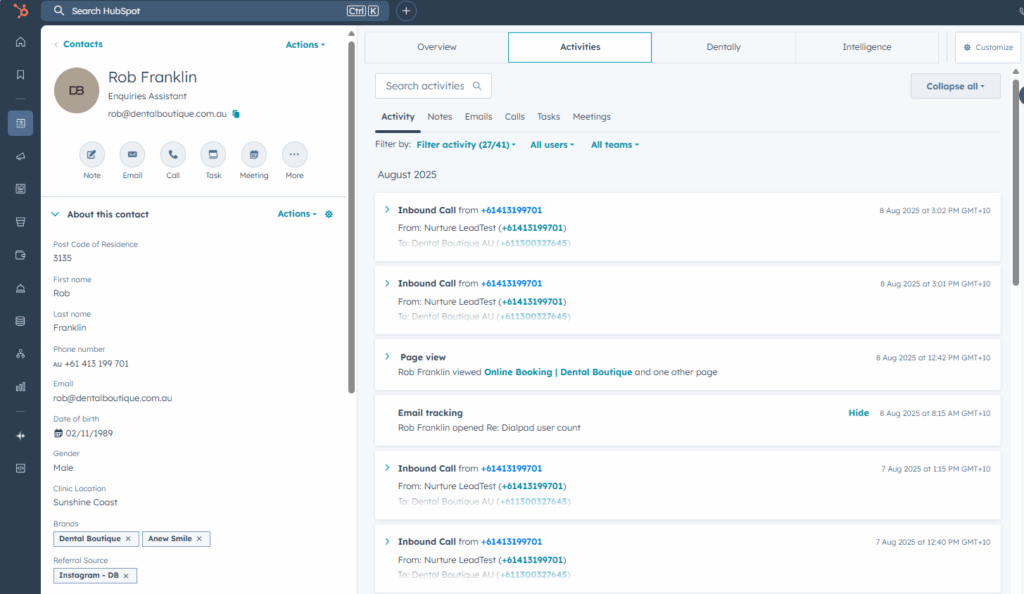
The image above is an example of what we see when we open a contact page
It gives us all the information about our patients – when we open a patient profile in HS, this is the information provided
- Personal details (name, number, email etc)
- Their postcode – which we use to determine their closest clinic
- any enquiry information they have provided
- Treatment querries
- Concerns
- Any communication information
- When we contacted them and what method of communication
- Phone calls
- SMS
- Emails
- Any communication they have sent us
- When we contacted them and what method of communication
- What workflows they have engaged in
- As well as all our information regarding billing and treatments
When we try reach the patient on the phone, we aim to build on this by inputting
- Close won/lost information
- Assuming we land the booking
- When we have booked them in for their NP appointment
- What treatment they are booked in for
- How many days until they are booked
- If we lost the booking
- Why we may have missed the booking (assuming we lose the booking)
- Assuming we land the booking
All the information entered provides the PCs a chance to best secure the treatment plans too! They use our notes to best aid the patient in their treatment planning
What is a contact?
Contacts are our patients – they are who we are calling to book in for a new patient consultation.
When someone puts in an enquiry or calls DB, a contact is created – either by automation or manually by the agent on the phone.
When a prospective patient submits one of our enquiry forms or downloads a price list, they become a contact in Hubspot. All their details are collected as part of the enquiry/download and they become what we refer to as a “lead”. A lead hasn’t been contacted yet and is our opportunity to book into one of our sites
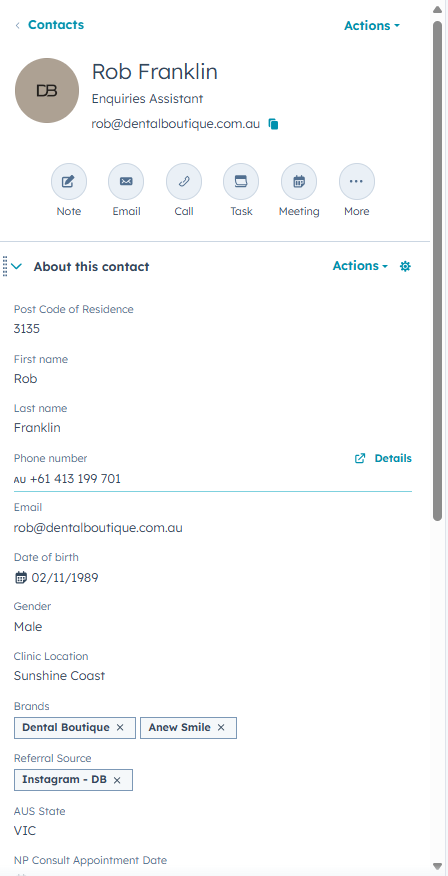
The information provided in the contact screen tells us about the personal details relating to that contact. It shows us at glace their contact details and appointment information. The contact information also includes marketing information such as the contacts original source, closest clinic and how long they’ve been in our system for.
Providing a patient uses the same email address, if they submit a further enquiry form it will update their details to the most recent option. More on this in the next lesson!
What is a deal?
A deal is the information provided by either the enquiry form or the treatment plan, once they have had an appointment. A contact puts in an enquiry form when they want to get more information or make a booking for dental work.
Enquiry forms can be submitted either directly from the website or via a Meta submission (Facebook/Instagram). Either option follows workflows with in Hubspot that determine how we interact with the patient.
Each time a contact submits a form, Hubspot creates a new deal in that patients file. This allows us to see how many times a contact has enquired. Once booked in, a new deal is create for the PC to work on and submit treatment information – we do not interact with this deal, only the deal in the “Contact Pipeline”
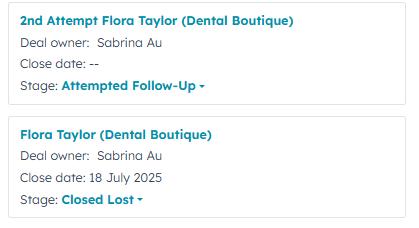
As we can see here, Flora has put in an enquiry and been close lost – we can’t see why unless we dig into the deal a little, more on that in a future lesson! What we can see though is that she has re-enquired and we are still trying to reach her
There are two main categories of deals we will see in Enquiries
- Contact pipeline (Enquiries)
- PC Pipeline (PC)
We only work with the Contact pipeline, this is where we find the information we need about the patients concerns and also where we enter any booking information. Tasks are allocated to deals and the majority of our work in Enquiries will be done from the deal page
At a glance, we can easily see where and when the patient is booked; as well as who made the booking and what the booking is for. Behind the scenes, the deal informaion also includes what kind of consult has been booked, how many days between contact and booking or even estimates on value (used by finance not us)
The example here shows a successful booking. If the patient was close lost, we could find info here on why that might have happened
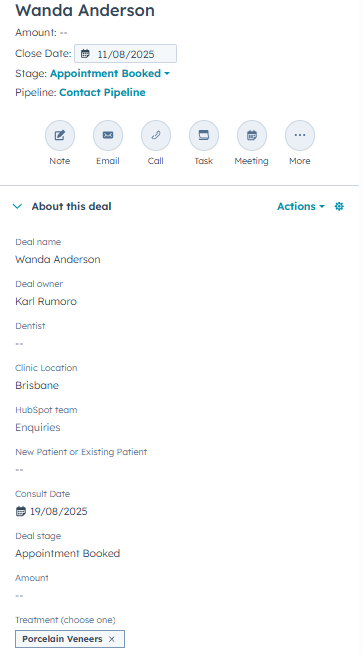
We also find playbook information as well as call logs/recordings; this is covered in our deals lessons. The main takeaway from this lesson is the following
- Contacts are created once and updated as patients put in multiple forms – providing they use the same email address
- A contact can have multiple deals depending on how many enquiries have been placed