
In this lesson we cover (click on bullet point to jump to topic)
Deal stages
In our day to day in Enquiries, we operate out of two main deal stages. The other four deal stages are situational
- Main deal stages
- New lead
- Attempted follow up
- Situational deal stages
- Future follow up
- Requested call back
- Close lost
- Appointment booked
Main deal stages
All new form submissions start their journey as a “New lead”. This signifies that we are yet to formally contact the prospective patient. Each morning we work through the new leads that have come through over night as they are our freshest and hottest leads.
Before we do anything else with the patient, we MUST move the deal stage to “Attempted follow up”. This updates all the agents live that this patient is about to be contacted and not to try and call them. We don’t want multiple people calling patients at the same time, that’s not a good patient experience!
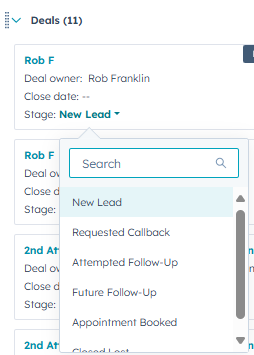
On the right hand side of the page is the deal information.
Here is where we are going to find the deal stage and change to “Attempted follow up”
Once we have done this, we follow the next steps
- Check contact information is correct (spelling, capitalization etc)
- Check off task
- Make the call (more on this next lesson!)
Any future tasks that may generate for this contact will generate in the deal of that patient. Task generation is based on workflows built into Hubspot that depend on the call outcome and deal stage. Providing the patient is still in Attempted follow up, they will generate tasks for us to follow up on them and 90% of what we do will be done with patients in this deal stage.
Situational deal stages
The other 10% of our work will be using the other four deal stages. Close lost and Appointment booked we will cover in more detail in the next lesson. Those are for once we talk to a patient and either win or lose the booking. The third option that might happen when we talk to a patient is when they are not in a position to talk right now. Meetings, driving, other appointments/commitments etc all come up for our patients and sometimes now isn’t the right time
In this situation, we put the patient in the deal stage called “Future follow up”.
This isn’t win or lose, but a not yet stage that keeps the patient warm for us with out sending any SMS messages or creating more tasks for us to contact them. When we go over the lesson about creating tasks, we will talk more about Future follow ups
This deal stage is different to the “Requested callback” stage – this one is an automated deal stage that contacts are placed into when they fill in a specific call back form. We will talk more about “form submissions” later in this lesson. We do not put contacts into this deal stage – TL’s will take people out of it and assign people tasks to call back.
Tasks
Tasks are the way you will work through your calls from Hubspot. They generate automatically each morning and the Team Lead on the day will allocate them out each morning and through out the day will continue to top your pipe up with more. Think of them like your own to do list
Depending on how the contact was created and which forms they have submitted, there are a number of tasks we use each day as well as some manually created tasks.
- FC1 – First attempts (see also; Re-conversion – First attempts)
- 2nd-5th attempts
- Price list downloads
- Affordability guides
- Alerts
- RQ call backs
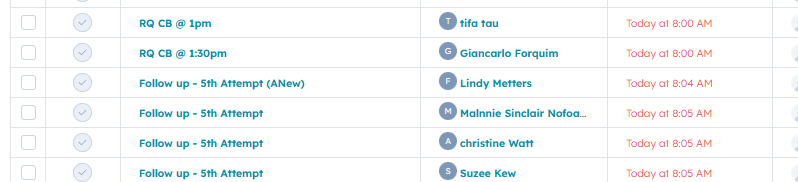
In this lesson we will go over what each task means, next lesson we will see how we action each task and logging them
First attempts
FC1 and Re-conversion tasks are both the first contact for a patient that generates after a contact submits an enquiry form on our website or via Facebook/Instagram. The FC1 tasks are brand new contacts who have never spoken to us, re-conversions are contacts who have submitted an enquiry in the past and in 99.9% of cases did not book last time they enquired. We action both the same way and treat them both as a first call to a new potential patient.
FC1 tasks will also be in the “New lead” deal stage and will need to be changed to “Attempted follow up”.
Its important to note as well, that these tasks are the only ones that are automatically assigned to an agent by the workflows in Hubspot. We aim to contact these patients as fast as possible as they are hot leads and ready to book – however, you need to ensure the task is assigned to you before actioning this task. The agent assigned has 5 minutes to respond to the task or it becomes fair game for any agent to take.
2nd – 5th attempts
These are referred to as our nurture tasks as they come from the nurture workflows. When a contact submits an enquiry form and we’ve made and logged that first call, a series of checks happen in the background and patients are either diverted to an SMS campaign or our nurture pipeline – depending on how likely that lead source is to answer our calls.
The contacts that met those eligibilty criteria end up generating 2nd attempts, which we action the same as the first attempt – we try and reach them via phonecall.
If they don’t answer, they go back into the nurture workflows and generate a 3rd attempt – and so on until after they have been attempted 5 times. At which point we move them to “Close Lost”
One thing often explained to agents too is that the only real difference between a 1st and 5th attempt is they are no less likely to book a consult! We just haven’t managed to reach them yet – once they answer, we treat all attempts the same.
Price lists downloads and Affordability guides
Price list downloads (PLs) and Affordability guide downloads (AGs) are contacts who have not submitted an enquiry form, but rather they have downloaded our pricelists – PLs from Dental Boutique, AGs from Anew Smile.
Some significant differences between these contacts and the nurture contacts are
- These contacts do not have a deal created
- We only make one phonecall to these patients then they change to an SMS and email contact campaign
As these contacts don’t enter our pipeline directly, the logging of their calls is super important (we will cover this in the next lesson). Incorrect logging wil mean these contacts get mixed up in different workflows and get the wrong messages sent to them.
The only two times a PL or AG contact has a deal created is if they also submit an enquiry or if we call them and land the booking. If we book the patient, we create a deal to ensure the booking is recorded.
Whilst these contact receive follow up SMS if we don’t connect to them, there are no follow up tasks created to contact them again
Alerts
Alerts are automated tasks that generate if an attempted follow up deal hasn’t been actioned for in 4 days. This is a contingency plan built into our workflows to ensure no contacts get missed. The usually generate if calls haven’t been logged correctly as this stops deals from generating follow up tasks.
These tasks require a small amount of admin work to check what call the contact is up to and what task needs to be done next.
For example, the patient may have received their 2nd attempt call but it was logged incorrectly so a 3rd didnt generate. We need to make the 3rd attempt call then ensure we log that call correctly so it generates the 4th attempt.
RQ call backs
RQ callbacks are a manually created task that either you assign yourself or another agent will send you (if they are unavailable) – RQ is our short hand for requested.
When we attempt to contact a patient and they answer, but can’t talk right now; we create a manual task titled “RQ callback” and put it in our own task pipe for the time requested or if you are unavailable then, tell another agent and send it to them.
It is super important at this point to that the deal stage is changed to “Future follow up” – this ensures that no further tasks are generated and we don’t call the patient before they are ready.
In the next lesson, we will go over these in more detail.
Activities page
So far, we have discussed the left and right hand sides of the screens (contact and deal screens) but not touched on the centre panel – the activities page.
This screen shows us everything we need to know about the patients interactions with us so far.
- Inbound/Outbound call information
- SMS
- Emails
- Form submissions
- Workflow activities
- Links they have interacted with on our website or from our emails/SMS
- Tasks
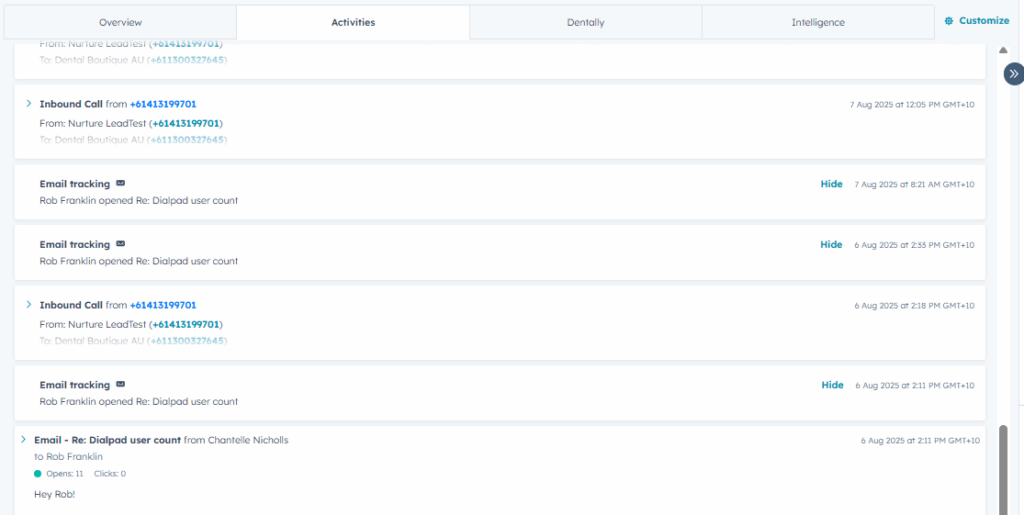
As it gives us time and date stamps, we can see exactly when everything has happened too. This is valuble as it lets us know what we should be doing next.
For example, before we action a task and call the contact, perhaps they have sent a text message to us and asked not to be called until a certain day/time – we can see this before calling and schedule a call back for that time instead. It’s important to check this page before making calls to ensure there are no important notes to pick up on.
We will show more about this page in the next lesson!