
In the previous lesson we discussed a standard call. In this lesson we will go over some possible variations to the norm and how to handle those. (click the titles to jump ahead)
- Price persistent patients
- Unfinancial patients
- Objection handling
- How to utilize the AI Training cards
Price persistent patients
In most cases, we can bring the call back to the script pretty easily. Something like a price persistent patient may only need one prompt to get back on track.
Let’s assume we have called a patient about their enquiry, gone through the initial greeting and call recording disclosure.
Whilst discussing their concerns, the patient mentions prices. This is a very common question as dental treatments are often pricy!
- Acknowledge the patient’s question. This is super important as if we just respond with the word track, it can sound dismissive – acknowledging the patients query lets them know we are listening and understand that it is important to them.
- Be confident you are giving the correct answer – any lack of confidence will potentially be taken advantage of by a pushy caller.
- Ensure you are bringing the call back to script. We need to be in charge of the call flow to avoid missing important steps in the call.
So when the patient asks for a price, the following response is a clear and easy way to respond.
“I’d love to be able to tell you a rough price, however until we can see your smile, we can’t offer any prices as each treatment plan is personalised. Let’s chat a little more about your smile so I can book you in with the best clinician for your needs.”
Often at this stage in the call, this is enough to get back on track. But later on when we are going through previous consultations/urgency they may try it again.
Questions like
- Can’t you just give me a ball park figure?
- Is it likely to be 10’s of thousands?
- How much is it per tooth?
If this is the case and they’re asking mutliple times, we again have a word track to get us back on track again.
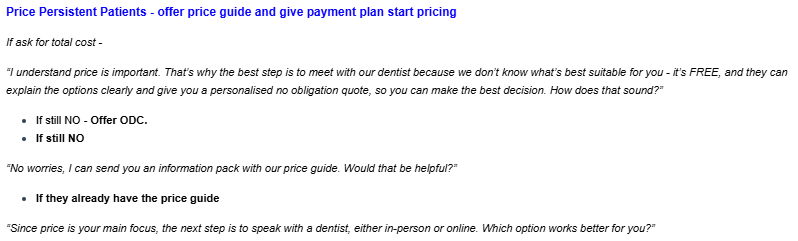
Again, this acknowledges the patient but brings us back to the point that they need a consult for a price.
Giving the patient muliple options helps keep them on track too!
At this stage, once they commit to a booking, the questions usually stop about prices.
We’ve just gotta get to that part!
Unfinancial patients
We’ve already touched on price, so lets move onto patients who we call “unfinancial patients”.
These are patients who for some reason we deem unlikely to be able to afford treatment.
- Pensioner
- Centrelink
- Medicare/Bulk Bill
- Unemployment or any indication that patient does not have capacity to pay
- Government Vouchers
- Expect a cosmetic/Implant under 5k budget excl. Single Implant
We classify the pensioners/centrelink/unemployed patients as unfinancial as one of the three criteria for our payment plans is that they are working 25 hours per week. So they won’t meet requirements.
People asking about government vouchers or asking about bulk billing are also not likely to be able to pay for treatment or suitable for payment plans.
The last one usually comes up when discussing previous consultations. When we ask if they’ve seen another clinician and they say something like “Yeah, I saw someone recently and they quoted me $5,000 for 4 veneers! Outrageous?!” – they probably won’t be happy with our quote either…

One thing that’s important to check before offering this option, check the patients form submissions and make sure they haven’t already downloaded the price list.
If they have the word track “I can see you’ve downloaded our price list, have you had a chance to read through it?”
Often they haven’t and it gives you a chance to redirect them back to it.
Objection handling
These patients aren’t always super clear. They follow the script and almost seem to be interested but when it gets to booking, they start to make excuses.
- I need to check my calendar
- I’m not sure what my work schedule will be
- I need to check with my partner
- In any of these responses, the word track below is helpful to keep the patient in the books!
- “Absolutely, check your schedule, but for now I recommend getting the appointment in just because we do fill up quite quickly and I’d hate for you to miss this opportunity!”
- If they still don’t want to book, try this to line up a call back.
- “That’s no worries, tell you what; I’ll schedule a call back for you for in a few days from now to lock in a time that works for you!”
- This keeps them in the system for a follow up – if we rely on them to call us, they may forget – this keep us on it as we have the ability to set more reminders!
- In any of these responses, the word track below is helpful to keep the patient in the books!
If you are ever getting a vibe off a patient they are potentially just going through the paces, but could still potentially be a good booking we can direct these patients to organise a callback later in the week or maybe even send them a message to book online in their own time.
Ideally we keep them in the call flow, so scheduling an RQ is the best option (we discuss how to do this in the Task lessons in the Hubspot course). This gives us a chance to talk to the patient again after they check their schedule etc.
If they don’t want a call back, we can instead send them a message with a link to book them selves in.
Each site has their own template to follow as each link is different.
We also need to update our name in the message.

It’s good to word this in a way that doesn’t give the patient a chance to say no to getting this message too.
If they don’t want a call back, saying “No worries, what I’ll do is send you an SMS with some info and a link to book your smile assessment at your own convenience.” – Then just send it!
How to utilize the AI Training cards
There is A LOT to remember – we get it!
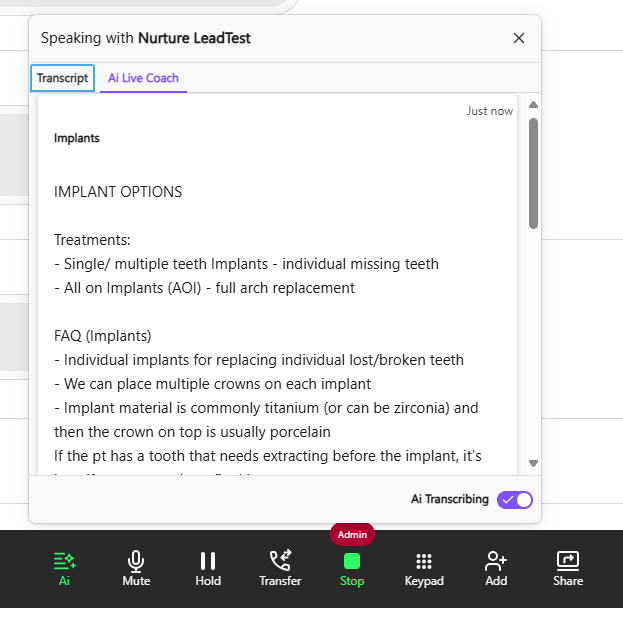
So, to help, there are dozens of AI Training cards that generate automatically while you are on the phone to the patient.
These are like cue cards we set up and are triggered by key words – said by yourself or by the patient.
There is so much info on the cards that can help guide your word tracks and be used along side the script to help land the booking.
There are many trigger words that generate these training cards.
In this example, all I said was “I’m interested in implants” and the cue card came up straight away and gives information on implants including
- Different kinds of implants
- FAQs
- The process of getting implants
- Payment plan info
- Time lines of treatment
Different cards have different info and if the conversation changes track, the cards change with it.
Use them along side the script to aid you in landing the booking!
These are the main reasons we end up having to go off script a little.
There may be other one offs, but the important thing to remember is that we need to bring the patient back to the script.
No matter how many rogue questions they ask, bringing them back to the script will give you the best chance to land the booking.